
The Popsicle Manual
~ Shuvam Manna, Sep 2026
Hello there,
Thank you for taking the time out to take Popsicle for a spin. It is not just another regular web-editor with AI plugged in. It’s based on the thesis that software designers who want to get a feel of the exact material they’re sculpting with ⎯ code, need some more affordances, and pipelines and workflows that do not yank them entirely out of the space where it is more comfortable to explore ⎯ the canvas.
There is no one-size-fits-all formula that applies to the process every software designer can adopt to reach the pinnacle of their game and ability. Popsicle is a tool that distills on one of the umpteen opinionated approaches regarding how we should fundamentally think or tweak with interfaces and gives you a supporting cache of tools, so that you can finally start pulling the strings of your ideas. The ideas are still yours, Popsicle merely gives you a new steering wheel to yank and squish the code until the output is what you were thinking of a few minutes ago.
Getting Started
HTML, CSS, and JS form the basic primitive formats Popsicle is built around. I love HTML ⎯ and that being the the original language the web is written with (regardless of whatever frameworks and abstractions we build on top) makes ample amount of data available for models to learn from. And besides, in the early-mid 2024 period, when context windows had still not broken significant barriers, compressing and passing the right context mattered more so that we don’t get context bloat and start getting weirder/unreliable outputs. Working with HTML helped us bypass having a whole dependency tree and having to rely on multiple files. A single HTML file with style and script blocks fulfilled most of the issues I was facing while trying to get models to work with a single file.
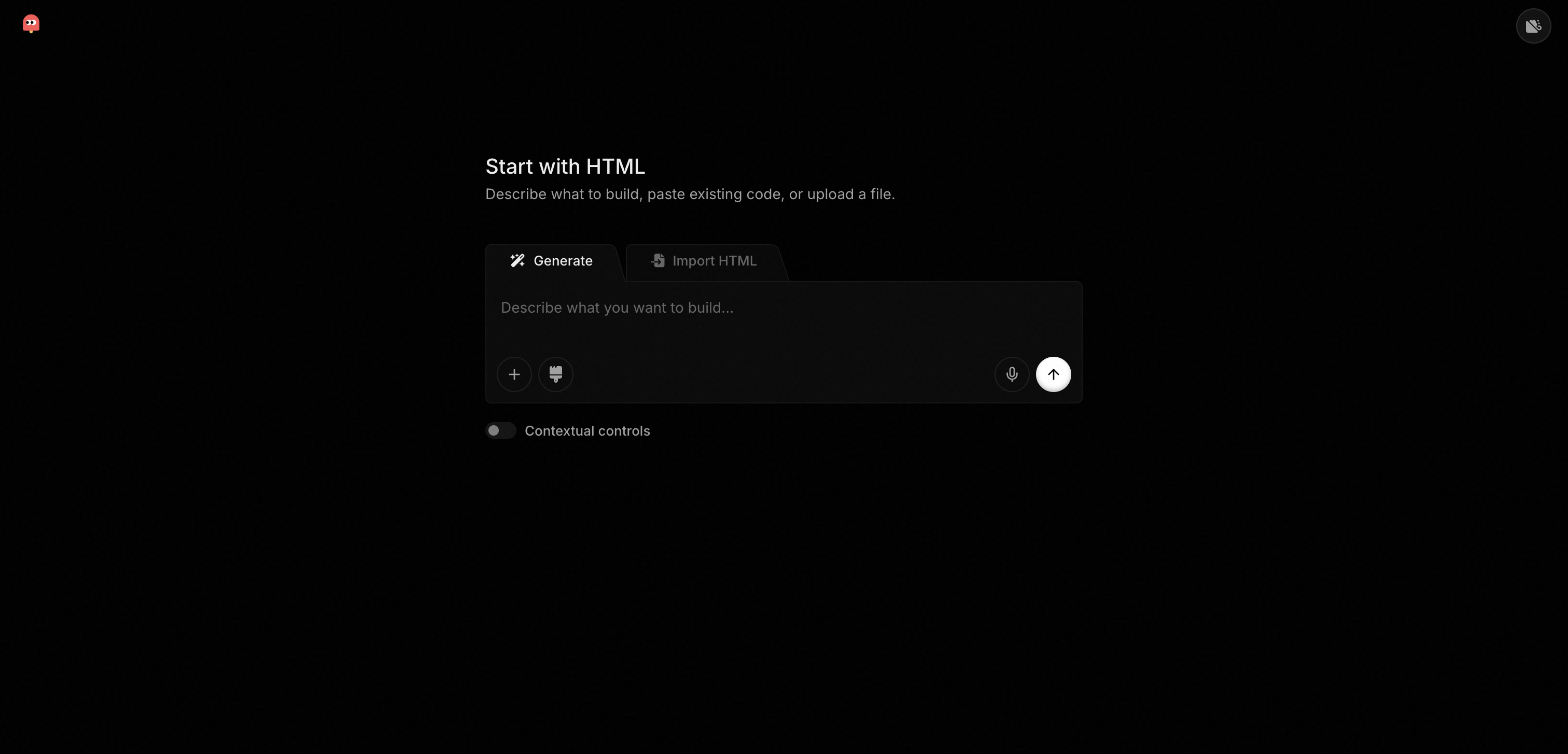
Popsicle starts you off with 2 options on the screen :
Generate: which allows you to prompt your way to the first checkpoint, or
Import HTML: you can directly paste HTML in the input box, or import a file from your computer, and see a live preview.
The Editor
The best part about Popsicle is the good old referendum to some classic software like codepen and jsbin. Where you simply open a new tab, go to the site, and start writing code, or as we do now, prompt your way with the model gods.
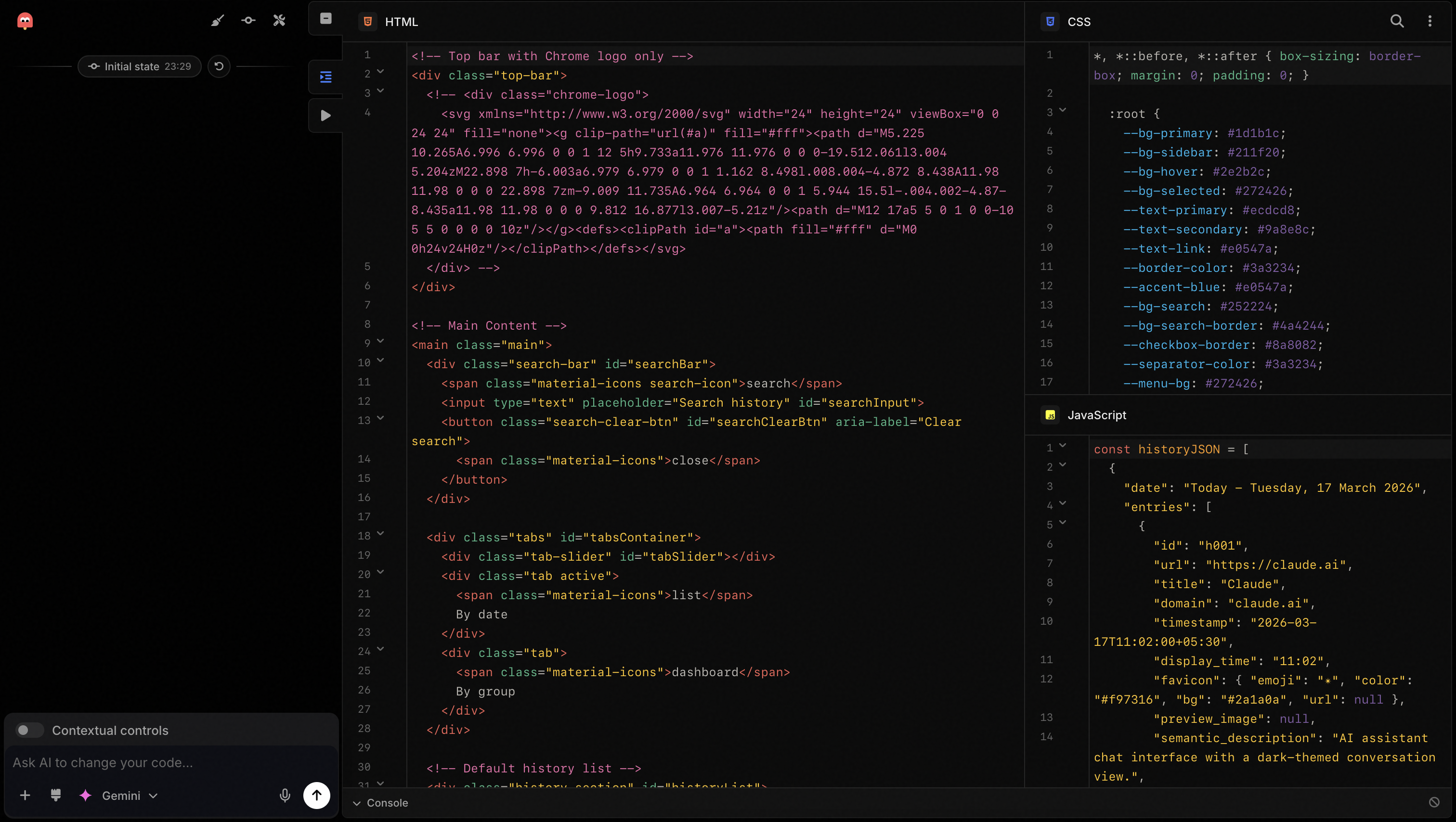
The editor works on it’s own even without any models activated. You can still edit code, see the preview, use the inspect tool to narrow down your field of vision, and leave annotations.
You can :
- Change the layout of your editor ⎯ see unified or split views, resize panes.
- Semantic codeblock explanation ⎯ when you want to understand what a piece of code is doing, Popsicle shows you a semantic summary if you have your AI models connected.
- Doing this over time automatically builds a semantic index of your code, and in turn, allowing us to do semantic search over the codebase.
- The AI control plane on the left with the ability to add any attachments, hand-drawn doodle input, napkin sketches, speak with your voice instead of typing the specifics out.
- You also get a fully functional console.
- You can fold code blocks that are not relevant so that you stay razor focused.
Popsicle Capture
In the good old days, you could learn about the web and how a website was built by saving it locally and then going through the source code. But now that you edit and morph and sculpt with HTML, you should be able to grab the HTML from any website and remix it in Popsicle.
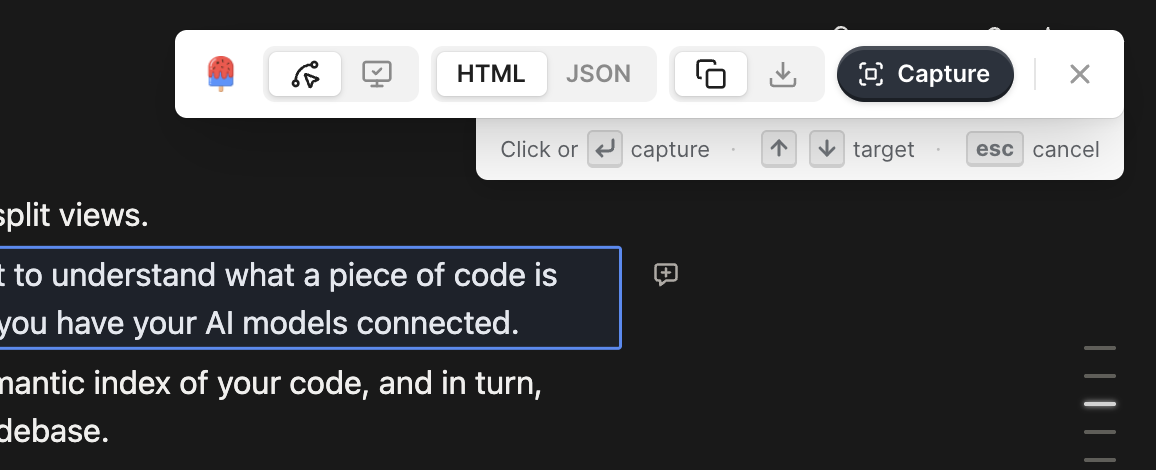
Popsicle Capture is a Chrome extension that lets you grab a whole page or a part of it as either HTML or an encoded JSON format, and import that into Popsicle.
Popsicle Import
One of the more curiouser way in which I work is to first get the interaction/mechanism that I want to prototype right. i want the models to work unburdened by the guardrails of tokens and style guides. Language models are extremely good translation machines ⎯ and one of the fundamental tenets of Popsicle that once the mechanics are in place, tokens to get the component on brand is a simple style transfer away.
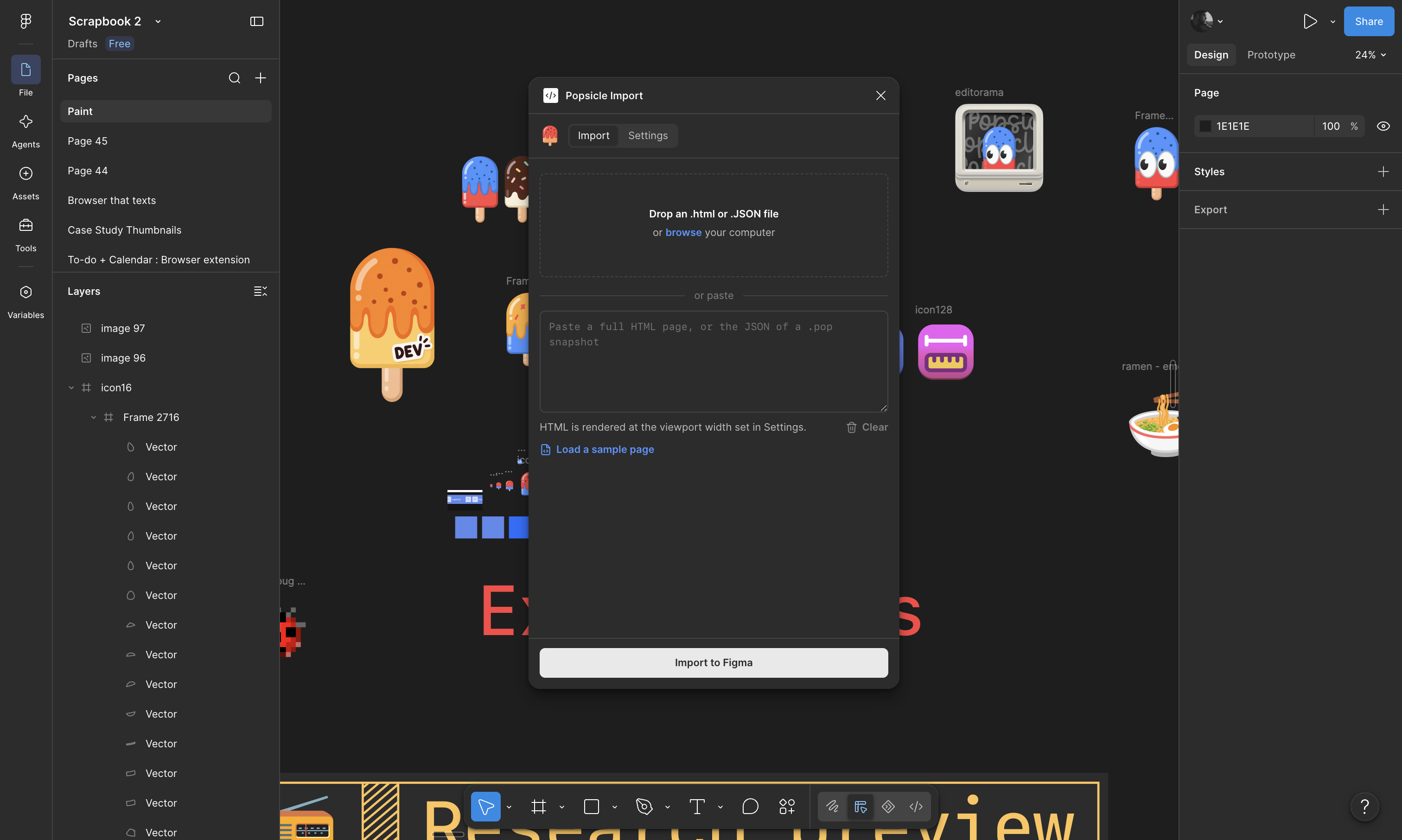
Popsicle Import is a Figma plugin that allows you to load up a website JSON or HTML (that Popsicle exports) and render it natively on figma so that you may do the final visual adjustments in the comforts of the canvas, away from the HTML forge.
Time Machine & Checkpoints
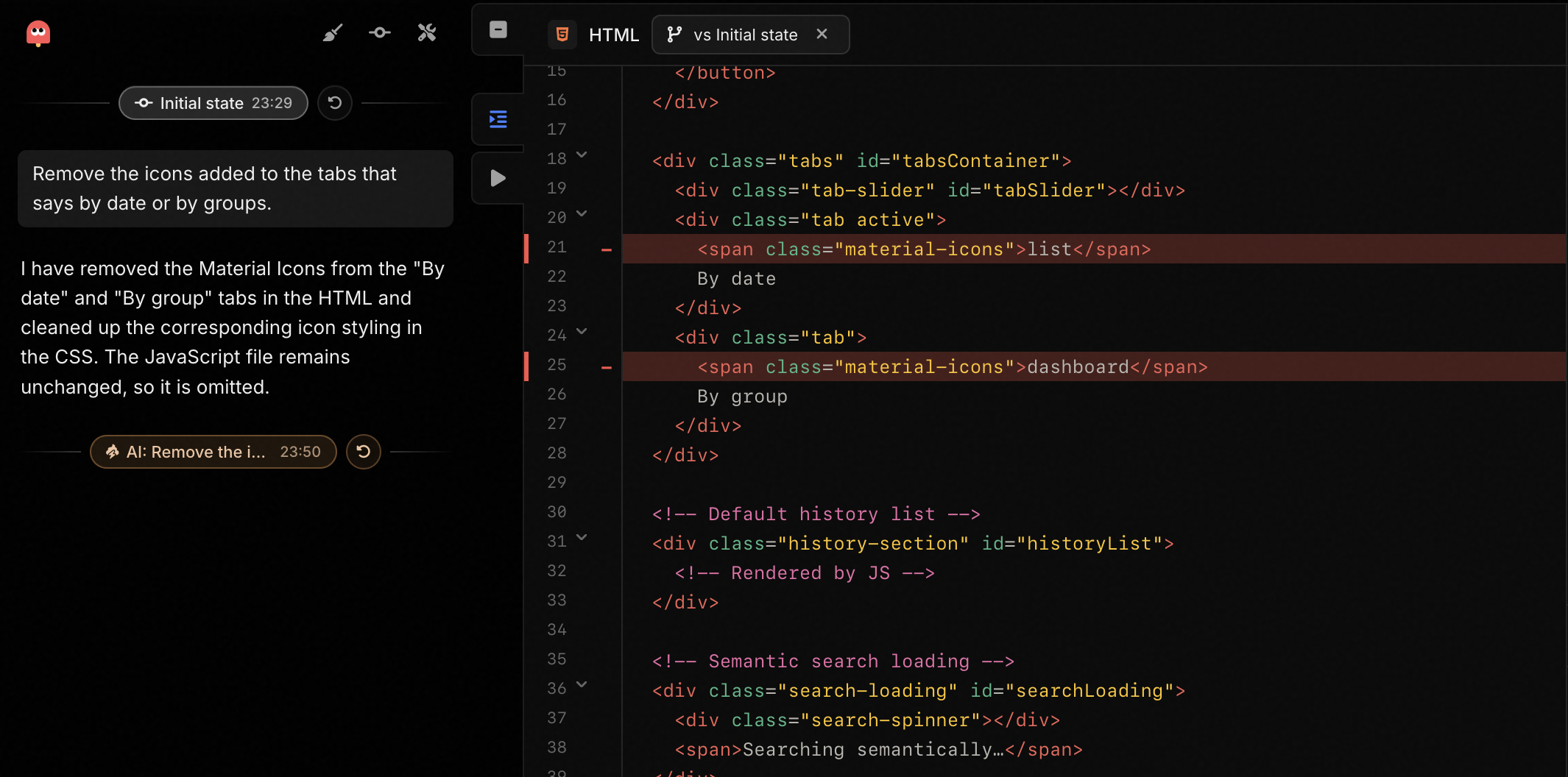
This is where version control comes in. You can manually add a checkpoint at any time by simply clicking on a button. All changes made by AI, style transfer, annotation fixes, etc. come with their own checkpoints. And you can click on any of the checkpoints any time to see the diff between the currently active version and the selected version.
You can restore to any earlier version or checkpoint and start again if something botches up.
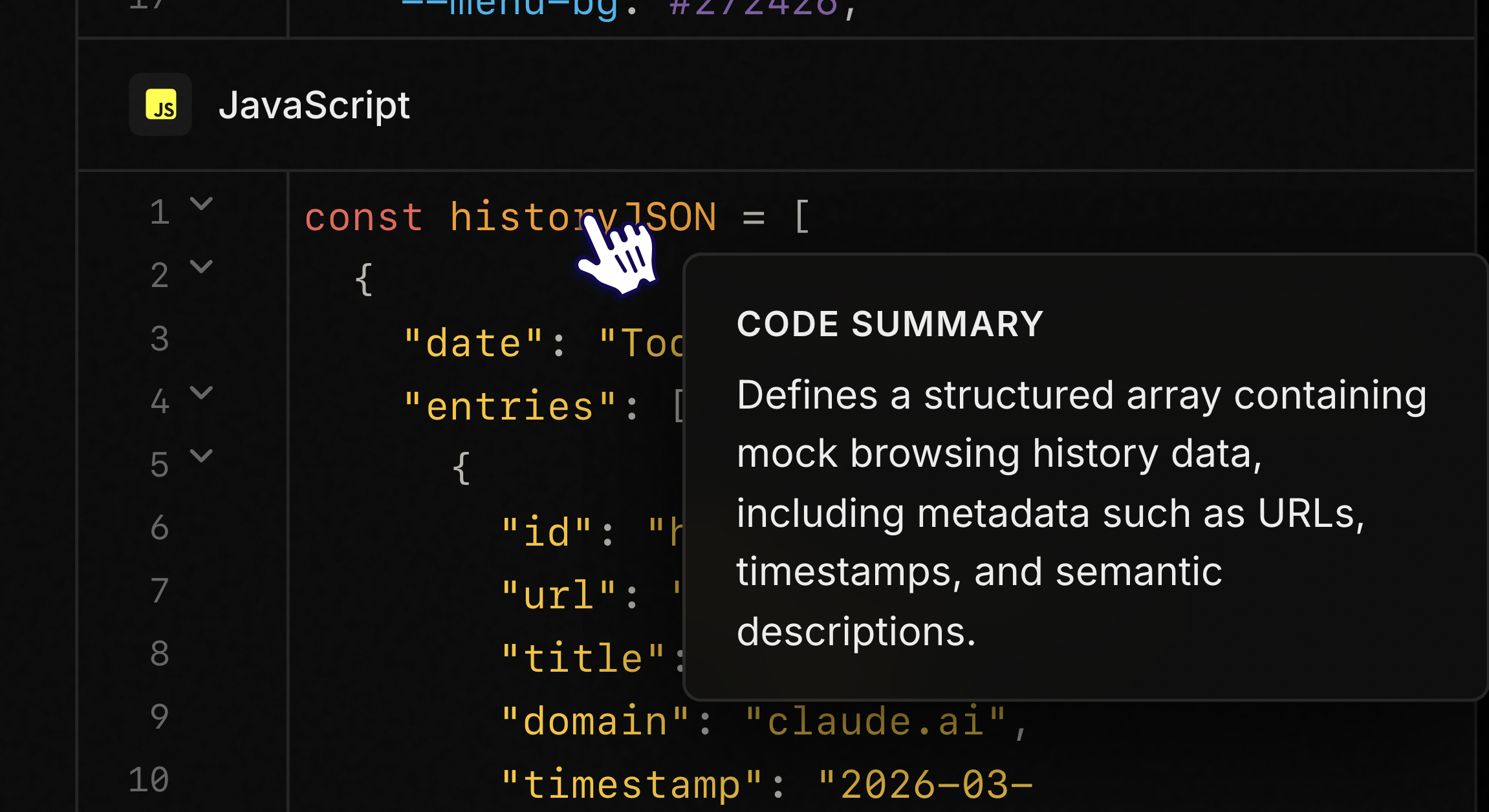
Semantic Overview
Hover over any block of code and get a semantic overview of what that codeblock is doing. Applies to javascript, HTML, and CSS.
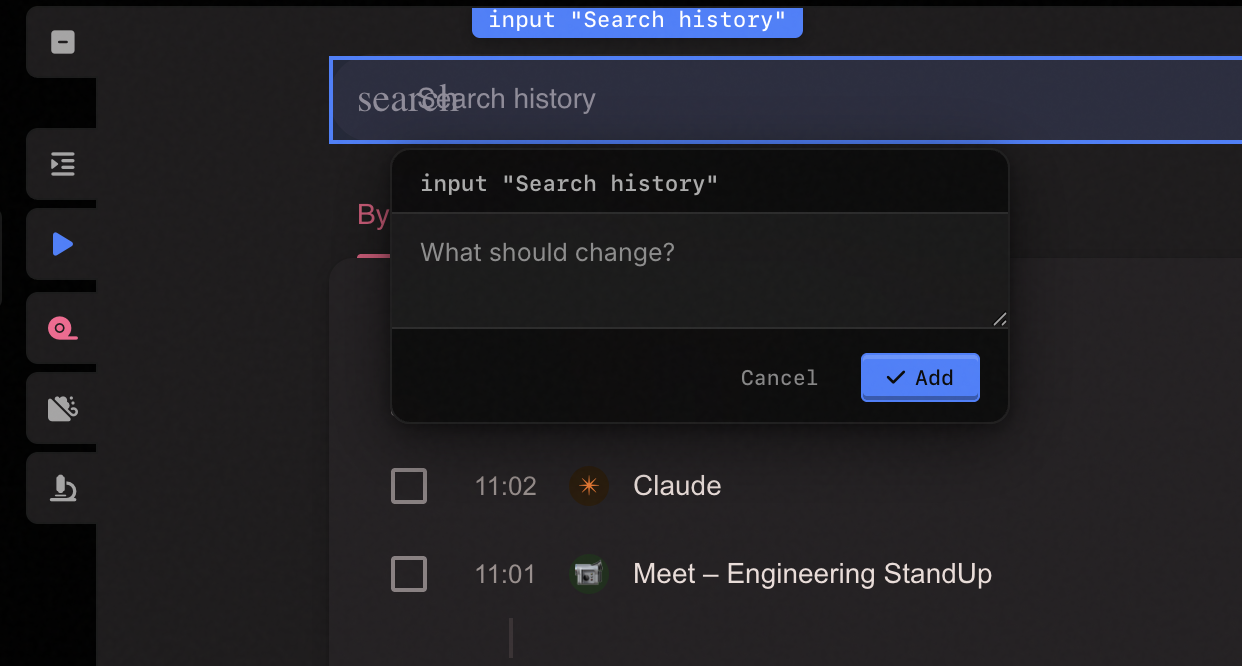
Annotate with comments
Add comments to parts of the interface to either keep notes for yourself, or, AI models are connected, then to deploy them to get those comments addressed.
All comments are tied to the specific element you hover on, giving you better, richer context of the code that the model can directly grab and make changes.
Inspect Mode
Inspect mode is a powerful tool that gives you all the possible CSS values related to the selected element right at your fingertips. You can make changes to any element, and merge the changes into the codebase.
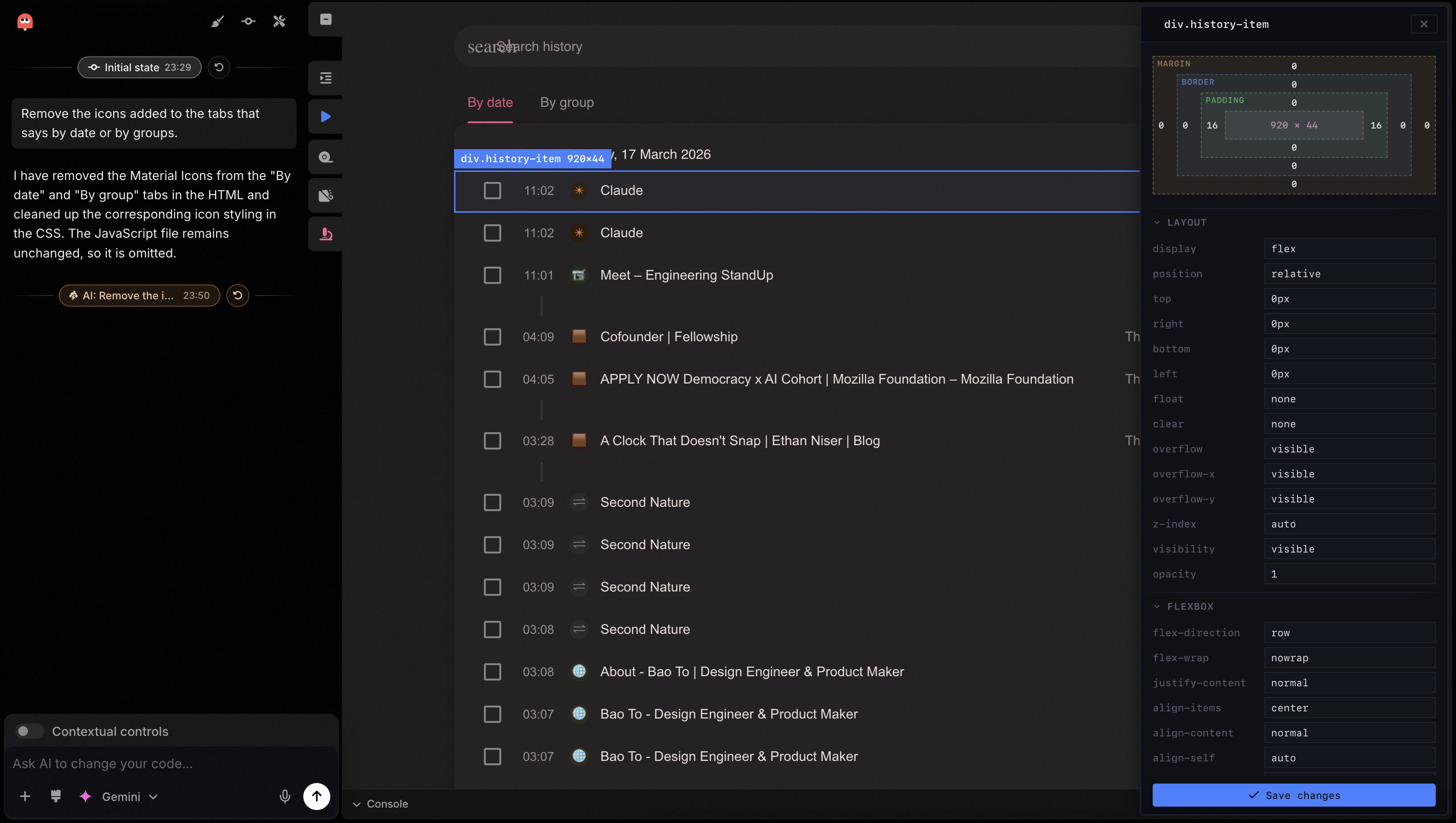
You can move the Inspect panel around, resize it, or even dock it on the control plane to replace the chat.
Style Transfer
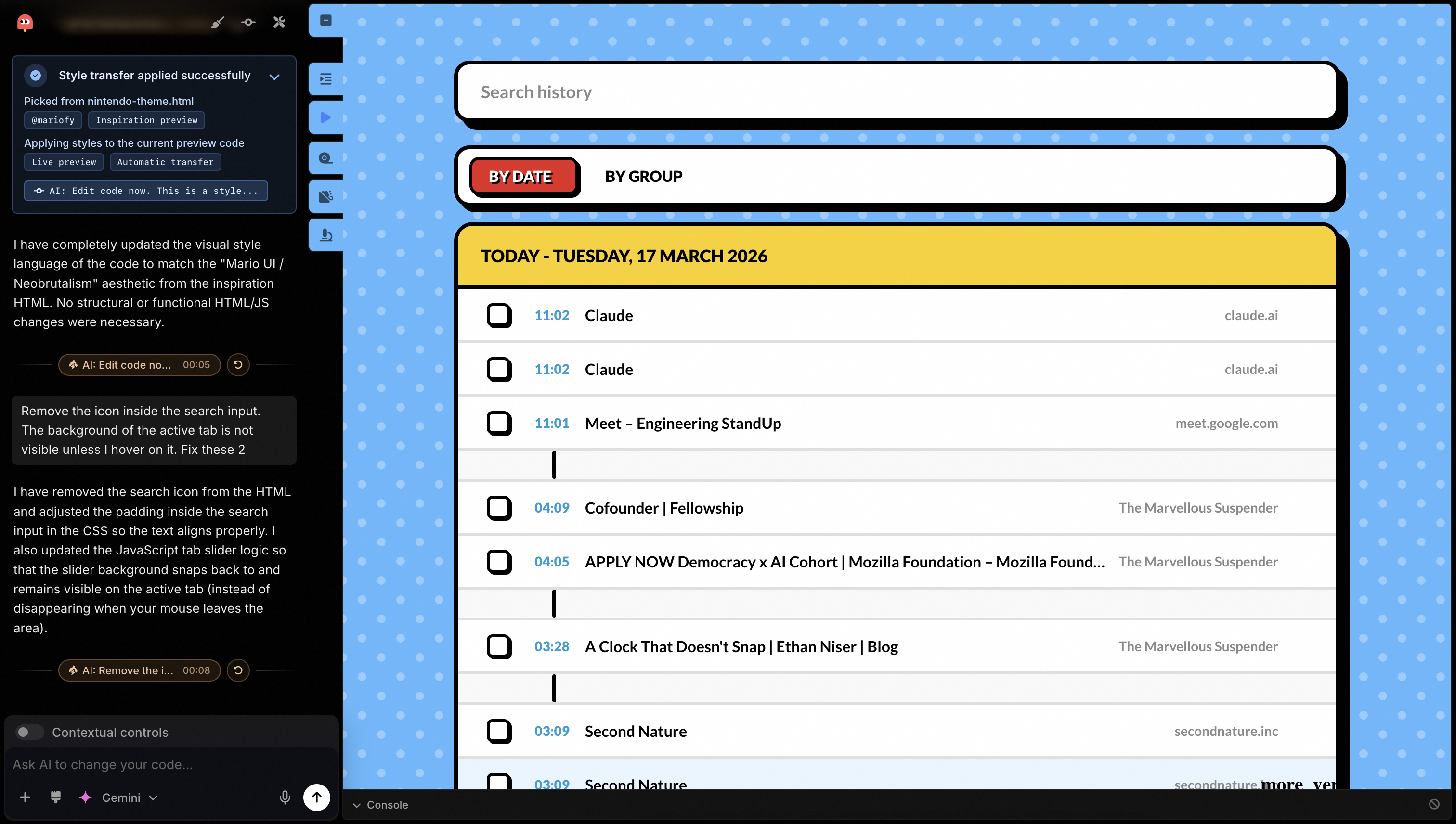
Using the style transfer tool, you can theme your prototype in any visual style reference that can encapsulated as an HTML. You can capture a webpage you fancy, and then add it to Popsicle’s Inspiration board.
While prompting your model, you can either use @ to refer to the style inline. Or you can use the style dropper tool to pick up the style from any reference inspiration style and translates that to the visual aesthetics of your creation.
After Style Transfer :
Contextual Controls
What if you let your models know of what are your areas of interest, and Popsicle will only show you the relevant controls to tweak and fine tune the “feel” and “vibe” instead of making you search for the right parameters to tune.
Turning on the toggle for Contextual Controls gives you a control panel with only the controls you want.
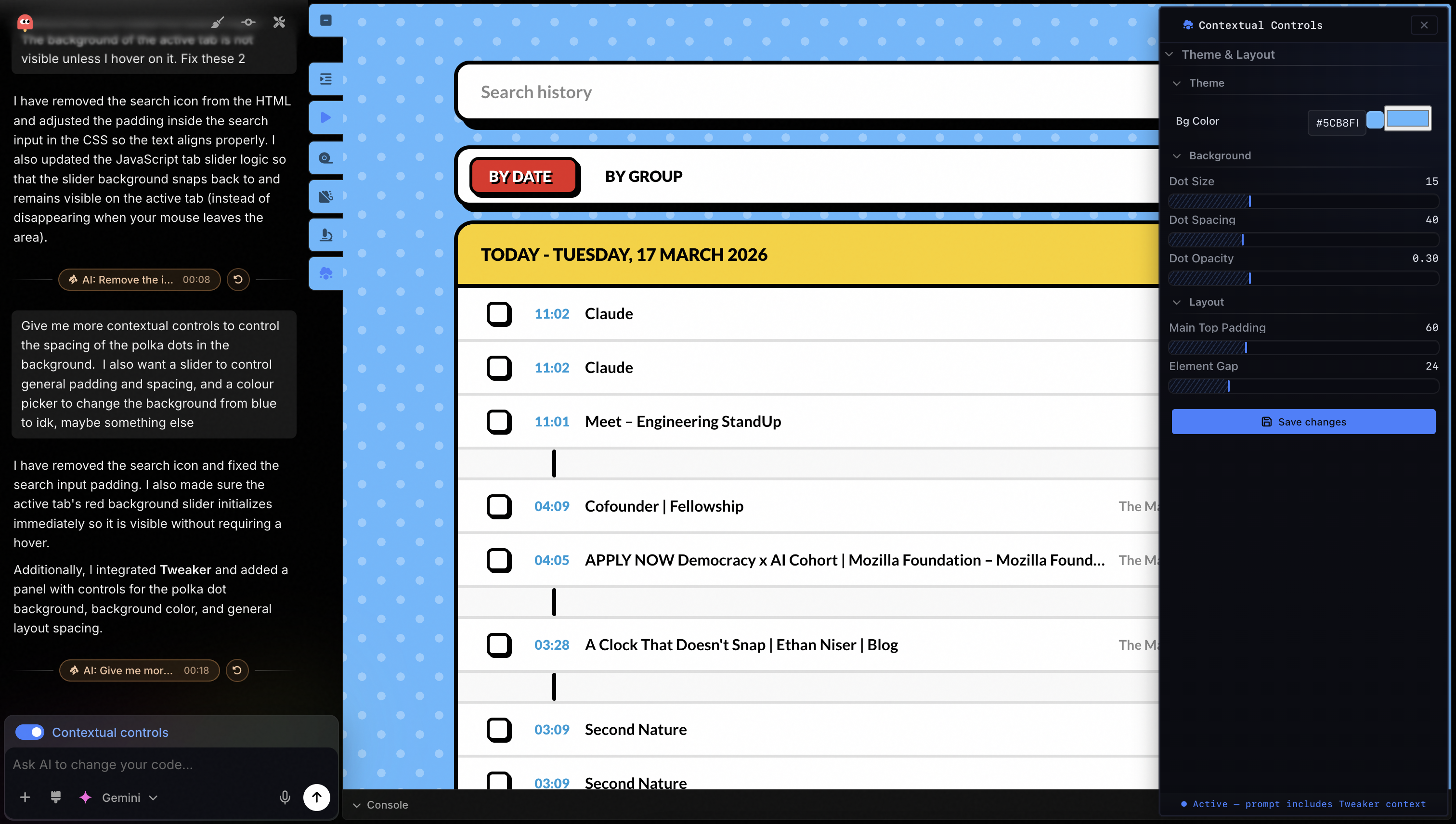
This feature is a little wobbly since models can get a little fickle. I wrote a system called tweaker to define the logical bounds and guardrails on dynamically generating these controls.
I took some inspiration from dialkit when it came along sometime later and that seems to have stabilized this feature a fair bit, but this is still being ironed out.
Make it Pop
This tool is called Popsicle simply because I really wanted to add some weight to the phrase Make it Pop and map it into a more deterministic visual output.
Coming soon(ish) ⎯ stay tuned 🫡
Popsicle is intended for you to simply open a tab and create your prototype. It hides away sufficient visual controls and gives you a sense of how the material feels, how it changes underneath your fingers as you mash away at the keyboard typing out a huge prompt to morph the code. But not every single change requires a prompt ⎯ and popsicle gives you higher fidelity tools to make just enough change without wrecking your prototype.
For more questions, ideas, and feedback, please reach out on Twitter.